How to Contribute
Step One
When you find a post for which you can contribute information about a photo, click on the image title. You’ll know you’ve selected the title when the cursor turns into a pointing hand and the words are underlined.


Step Two
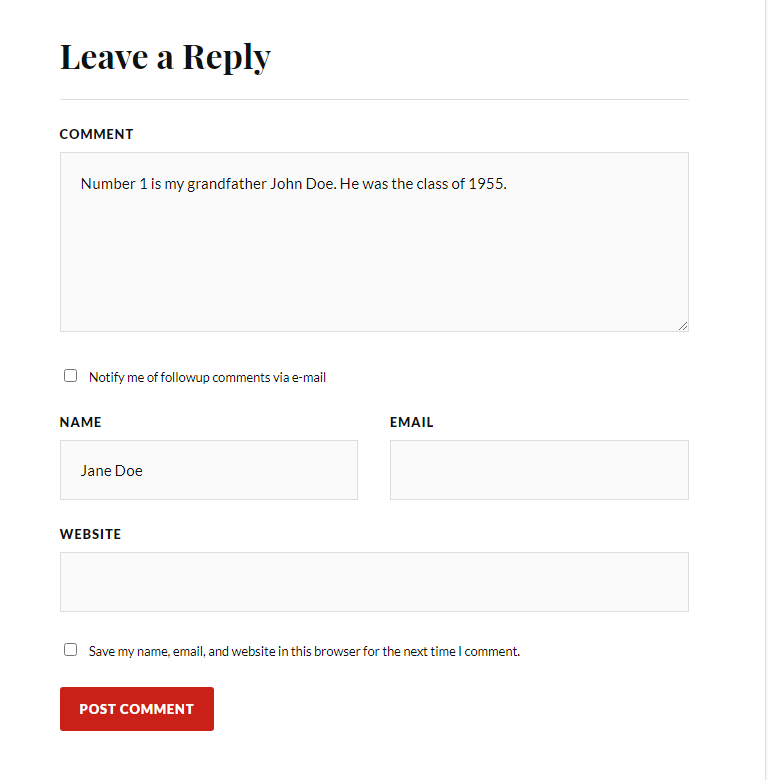
From the image page, scroll down past the photo until you see a “Leave a Reply” with a comment box beneath it. We’re looking for people share information about the photo or about the context of the photo. If you’re an alum, we’d love to know your class year! Who else is in the photo? What year was the photo taken? Where was the photo taken? Tell us about the event taking place in the photo. Any information you can provide will help!

Step Three
Your email address is not required, but you can opt in to receive updates on future comments from any post. Select “Post Comment” and you’re done!